
Download MarsEdit 4 – Free Desktop Blog Editor for WordPress, Tumblr & Blogger
Overview
MarsEdit 4, developed by Red Sweater Software, is a powerful desktop‑based content management tool designed specifically for bloggers who want to write, edit, and publish posts without opening a web browser. The application bridges the gap between offline writing comfort and online publishing efficiency, offering a seamless workflow that works across the most popular platforms—WordPress, Tumblr, Blogger, and many others that support XML‑RPC or Atom APIs. By storing drafts locally, MarsEdit lets you craft posts in a distraction‑free environment, run a built‑in spell checker, and preview how your article will appear once it’s live. When you’re ready, a simple “Sync” button pushes the content to your chosen blog, preserving tags, categories, and featured images. The interface is clean, macOS‑styled, and customizable, letting you arrange multiple blogs in a single sidebar for instant access. While the core experience is robust, power users may notice occasional hiccups with platforms that demand multi‑factor authentication or OAuth 2.0 flows—these cases usually require a manual token entry. Nevertheless, MarsEdit 4 remains one of the most comprehensive desktop editors on the market, praised for its speed, offline capabilities, and deep integration with major blogging services. Whether you manage a single personal journal or a network of professional sites, MarsEdit 4 offers a free, secure, and regularly updated solution that keeps your content creation process efficient and enjoyable.
Key Features of MarsEdit 4
- Offline Editing – Write drafts without an internet connection and sync later.
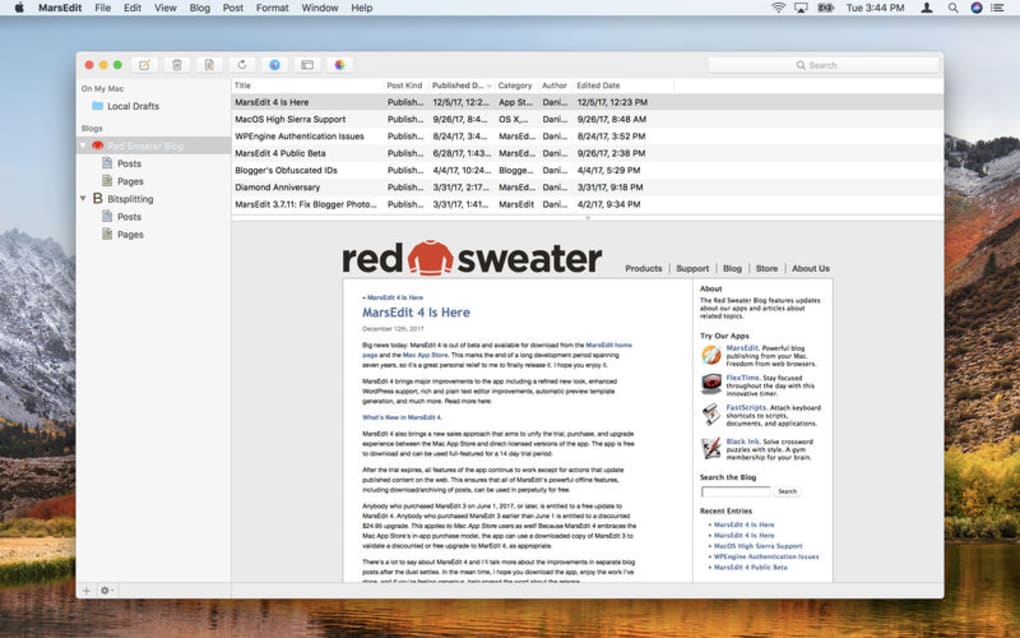
- Multi‑Blog Management – Handle unlimited blogs from WordPress, Tumblr, Blogger, and custom XML‑RPC endpoints in one unified window.
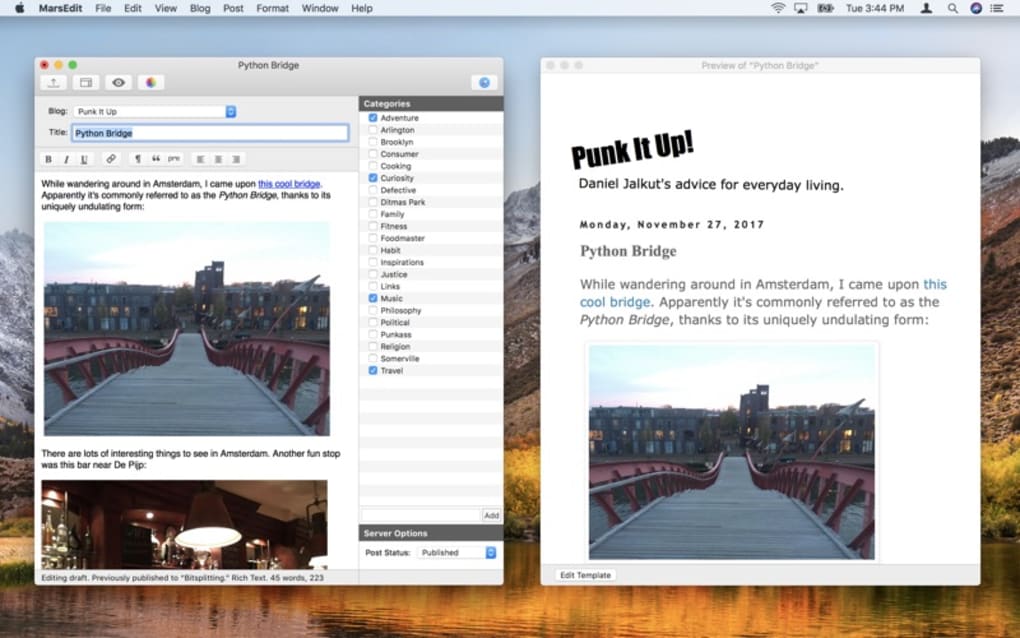
- Rich Text & HTML Support – Switch instantly between WYSIWYG, Markdown, and raw HTML editing modes.
- Built‑in Spell Checker – Real‑time language checking with customizable dictionaries.
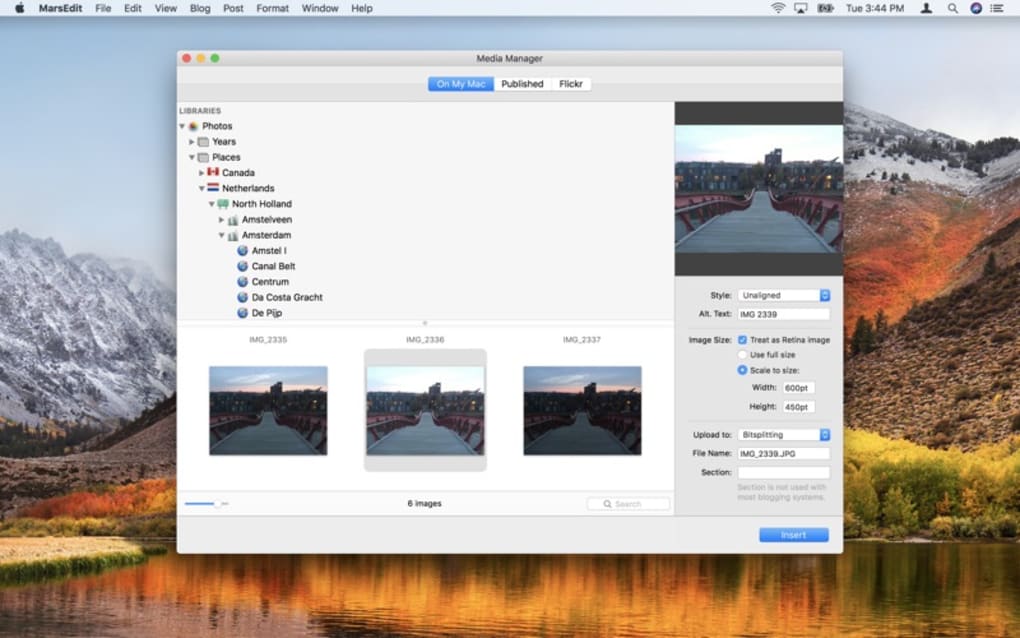
- Media Library Integration – Drag‑and‑drop images, videos, and podcasts directly into posts.
- Instant Preview – See how your post will render on the live site before publishing.
- Tag & Category Synchronization – Keep your taxonomy consistent across all platforms.
- Secure Authentication – Store login credentials in the macOS Keychain for safe access.
- Automatic Backups – Versioned backups of every draft to prevent data loss.
- Customizable Toolbar – Add or remove formatting buttons to match your workflow.
Installation, Usage Guide & Compatibility
Step‑by‑Step Installation
1. Visit the official Red Sweater Software website and click the “Download MarsEdit 4” button. The installer is a signed .dmg file, ensuring a secure download.
2. Open the .dmg, drag the MarsEdit icon into your Applications folder, and launch the app. macOS may prompt you to confirm that you trust the developer; click “Open.”
3. Upon first launch, MarsEdit walks you through a brief onboarding wizard. Choose “Add a Blog,” paste the blog’s XML‑RPC or Atom endpoint URL, and enter your username and password. The app will automatically retrieve your existing posts and categories.
4. For WordPress sites that use OAuth, generate an application password from your WordPress dashboard and paste it into the credentials field.
5. Once the blog is added, it appears in the left‑hand sidebar. You can repeat the process to add as many blogs as you need.
Daily Usage Workflow
After installation, start a new post by clicking the “+” icon. Choose the target blog from the dropdown, then begin typing. The editor provides a live word count, spell‑check highlights, and a formatting toolbar that adapts to the selected mode (Rich Text, Markdown, or HTML). Use the “Insert Media” button to embed images or podcasts; MarsEdit uploads them to your blog’s media library during the sync process. When you’re satisfied, click “Preview” to open a browser window that shows the exact layout of the published article. Finally, hit “Publish” or “Schedule” to send the post to the server. All changes are saved locally, so you can continue editing offline and sync later when you have an internet connection. The application also supports bulk editing—select multiple drafts, apply tags, or change categories in one operation, saving you hours of repetitive work.
Compatibility: MarsEdit 4 is a native macOS application, requiring macOS 11.0 (Big Sur) or later. It runs smoothly on both Intel and Apple Silicon Macs, thanks to universal binaries. While there is no official Windows, Android, or iOS version, the app’s web‑based sync capabilities allow you to edit on macOS and publish to blogs that are accessed from any device. For users who need cross‑platform support, MarsEdit pairs well with cloud‑storage solutions (iCloud, Dropbox) to keep drafts synchronized across multiple Macs.
Pros & Cons, FAQ & Final Thoughts
Pros and Cons
- Pros:
- Free to download and use with no hidden fees.
- Robust offline editing and automatic backup system.
- Supports a wide range of blogging platforms out of the box.
- Highly customizable interface for power users.
- Secure credential storage via macOS Keychain.
- Cons:
- Only available for macOS; no native Windows or mobile app.
- OAuth‑based platforms may require manual token handling.
- Advanced feature set can be overwhelming for beginners.
- Formatting toolbar focuses on HTML/rich‑text; Markdown preview is limited.
Frequently Asked Questions
Is MarsEdit 4 really free?
Yes, MarsEdit 4 can be downloaded and used at no cost. Red Sweater Software offers optional paid upgrades for additional cloud‑sync features, but the core desktop editor remains free.
Can I use MarsEdit with a self‑hosted WordPress site?
Absolutely. As long as your WordPress installation supports XML‑RPC (enabled by default), MarsEdit will connect, pull your existing posts, and publish new content.
What happens if I lose internet while editing?
All drafts are saved locally on your Mac. You can continue writing offline, and once you regain a connection, simply click “Sync” to upload your changes.
Does MarsEdit support Markdown?
Yes. MarsEdit includes a Markdown mode that renders your syntax in real time. However, the preview window shows the final HTML output as it will appear on the live blog.
How secure are my login credentials?
Credentials are stored in the macOS Keychain, which encrypts the data and restricts access to the application itself. This provides industry‑standard security for your blog accounts.
Conclusion & Call to Action
MarsEdit 4 stands out as a free, feature‑rich desktop editor that empowers bloggers to produce high‑quality content without the constraints of a web browser. Its offline capabilities, multi‑blog management, and deep integration with WordPress, Tumblr, and Blogger make it a compelling choice for both hobbyists and professional writers. While the lack of a Windows version and occasional authentication quirks may deter some users, the overall value—especially considering the zero price tag—far outweighs these minor drawbacks. If you’re looking for a secure, fast, and constantly updated tool to streamline your publishing workflow, MarsEdit 4 is ready for download today. Click the button below, install the app, and experience a smoother blogging routine instantly.
Overall Rating: 4 out of 5 stars
Pros: Free, offline editing, multi‑blog support, secure credential storage.
Cons: macOS‑only, OAuth handling can be tricky, steep learning curve for beginners.







